Witness
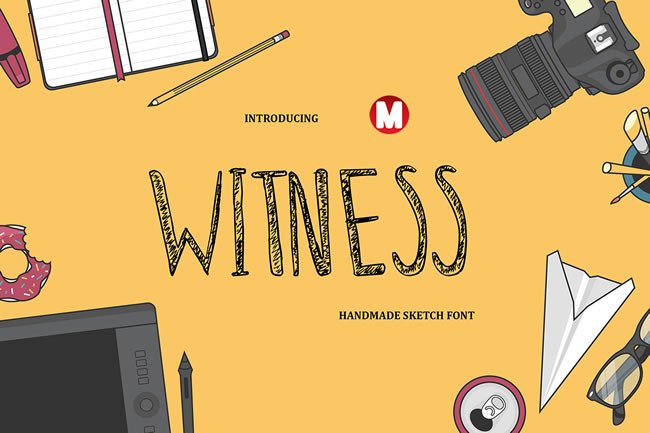
If you’ve stumbled across Witness, you’ve likely seen those playful, hand-drawn letters that bring a cartoon-like energy to any design. This handmade sketch font is popular among creators who want to inject personality into their projects—whether it’s for social media graphics, children’s book covers, promotional posters, or branding for small businesses. Its raw, unpolished strokes mimic the look of a quick marker sketch, and when used well, it can make your work feel approachable, whimsical, and alive.
Yet many people who download Witness quickly find that the results fall short of their expectations. The font looks charming in the preview, but when applied to a real project, it can feel messy, hard to read, or out of place. That gap between expectation and outcome often comes down to a handful of common mistakes—choices made before the font even touches your canvas. By understanding what those mistakes are and how to sidestep them, you can harness Witness in a way that strengthens your design instead of undermining it.
Mistake 1: Using Witness for Body Text or Long Passages
The most widespread error is treating Witness as a workhorse typeface. Because it’s fun and distinctive, designers sometimes think it will enliven an entire article, product description, or website paragraph. The reality is that handmade sketch fonts are inherently irregular—stroke widths vary, letters lean slightly, and spacing is far from uniform. When you set more than a few words in Witness, eye fatigue sets in quickly. Readers struggle to scan the text, and the message gets lost in the visual noise.
Better approach: Reserve Witness for headlines, short callouts, logos, or decorative elements. Use it in a few words that need to grab attention—the title of a poster, a single quote, a product name. Pair it with a clean, neutral font for the body copy. For example, a simple sans-serif like Open Sans or a subtle serif like Lora will let the sketch style shine without compromising readability. A good rule of thumb: if your text is longer than one or two lines, it probably belongs in the supporting typeface.
Mistake 2: Ignoring Letter Spacing and Kerning
Handmade fonts often ship with default spacing that’s either too tight or too loose. Designers who don’t adjust the tracking or kerning end up with awkward collisions between letters or unnatural gaps that break the flow. Since Witness has a loose, sketchy feel, you might think tight spacing adds cohesion—but it often causes ascenders and descenders to overlap, creating illegible blobs.
Better approach: After placing Witness in your design, zoom in and manually adjust the letter spacing. In most design software (from Canva to Adobe Illustrator), you can increase the tracking by a few points to give each character breathing room. For headlines, a little extra space between letters can actually reinforce the handmade look—it mimics the natural hesitation of someone drawing each letter by hand. Don’t rely on the font’s default; your project context matters. Test it at the size you intend to use, and tweak until each letter feels intentional.
Mistake 3: Overlooking Contrast and Background Compatibility
Witness has thin, uneven strokes that can disappear on busy backgrounds or low-contrast color combinations. A common mistake is setting the font over a photographic image with lots of texture, or choosing a color that’s too close to the background. The result is a word that looks more like a random scribble than a deliberate design element.
Better approach: Place Witness on solid, simple backgrounds whenever possible. White, off-white, pastel, or dark flat colors work best because they don’t compete with the font’s organic lines. If you must use a textured background, add a subtle drop shadow, a solid color block behind the text, or an outline effect to increase readability. Also, remember that lighter background colors usually make the thin strokes more visible—avoid using light grey on white, for example. Test your combination on the actual screen or print medium, not just in the editing preview.
Mistake 4: Failing to Check the License Before Using Witness Commercially
Handmade fonts often have specific licensing restrictions, and Witness is no exception. Many designers assume that because they can download the font for free, they can use it on commercial merchandise, client logos, or printed books without paying. This oversight can lead to legal issues, costly redesigns, or having to pull products from sale.
Better approach: Before you start any project, open the license file that came with your download (or check the marketplace page where you obtained Witness). Look for terms like “personal use only” vs. “commercial license included.” If you’re using it for a business logo, a product label, or any revenue-generating item, you likely need a paid license. Some font platforms offer extended licenses for embedding in apps or using in merchandising. Pay the fee—it’s usually small relative to the cost of redoing a whole brand identity. And keep a copy of the receipt. A transparent licensing approach also reflects well on your professional integrity.
Mistake 5: Assuming Witness Works at Any Size
Witness is designed for display use, often at sizes around 36pt or larger. When scaled down to 12pt or 14pt, the fine strokes become nearly invisible, and the irregular shapes make individual letters indistinguishable. Some hobbyists try to use Witness in a flyer for contact details or small disclaimers, only to find that the text is unreadable without a magnifying glass.
Better approach: Plan your hierarchy so that Witness appears only at larger sizes. As a rule of thumb, use it at 30pt or above for printed materials, and maybe 24pt minimum for digital screens. If you need a handwritten look at small sizes, choose a different font that is optimized for legibility at lower point sizes—there are many sketch-adjacent fonts that maintain clarity when tiny. Keep the little details your readers actually need (phone numbers, addresses, fine print) in a standard typeface.
Mistake 6: Neglecting the Overall Tone and Audience
Witness’s cartoon-style energy isn’t right for every message. A mistake marketers and small business owners make is forcing the font into serious or professional contexts—law firm brochures, medical pamphlets, corporate financial reports. The result can look juvenile and inadvertently undermine the credibility of the content.
Better approach: Before you choose Witness, ask yourself: “Does the tone of this piece lean playful, informal, or creative?” If yes, the font can amplify that tone. If the message is serious, authoritative, or highly technical, look for a different typeface. For example, a handmade sketch font might be perfect for a children’s party invitation, a craft fair logo, or a personal blog about illustration. But for a professional consulting website, you’d be better off selecting a clean sans-serif or a traditional serif. Matching the font to the audience’s expectations doesn’t kill creativity—it shows judgment and respect for the reader’s experience.
Mistake 7: Forgetting to Test in Different Mediums
What looks great on your screen might fall apart when printed, or vice versa. Because Witness has fine lines and irregular shapes, it can behave differently depending on the output. Screen rendering on low-resolution monitors might blur the strokes, while high-quality paper can exaggerate the ink distribution, making letters appear heavier than intended.
Better approach: Always test Witness in the exact medium you’ll use. If you’re designing for print, run a physical test with the paper and printer you plan to use. For digital projects, preview on multiple devices—especially mobile screens. Pay attention to how the font handles anti-aliasing; some sketch fonts get muddy when scaled down on a phone. If the test looks off, consider adjusting the stroke thickness (if you have access to a variable version) or switching to a different weight if one is available. A small test now saves a lot of rework later.
Mistake 8: Not Combining Witness with Supporting Fonts Thoughtfully
Even when designers avoid the body-text trap, they sometimes pick a supporting font that clashes with Witness’s personality. A too-formal serif can create a confusing visual mismatch, while a quirky second font might compete for attention and make the overall layout feel chaotic.
Better approach: Pair Witness with a neutral, highly readable typeface. Good companions are simple sans-serifs like Montserrat, Poppins, or Source Sans Pro. These fonts provide a calm contrast to the energetic strokes of the sketch font. If you want to stay within the hand-drawn realm, choose a clean script that doesn’t have the same level of irregularity. Test the pairing in a few layouts: headline in Witness, subhead in the partner font, and body text in the same partner. If the eye jumps naturally between the two without strain, you’ve found a solid combination.
Putting It All Together
Using Witness effectively means understanding its strengths and limitations. It’s a tool for emphasis, for emotion, for moments where you want your design to feel like it was made by human hands, not a machine. When you keep it at larger sizes, adjust spacing, mind the background, respect licensing, and pair it wisely, the font transforms from a tricky novelty into a reliable part of your creative toolkit. The possibilities truly are endless—but the best results come from a thoughtful, intentional approach. Take the time to test, tweak, and consider context, and you’ll find that Witness can give your projects a cartoon touch that feels delightful rather than distracting.