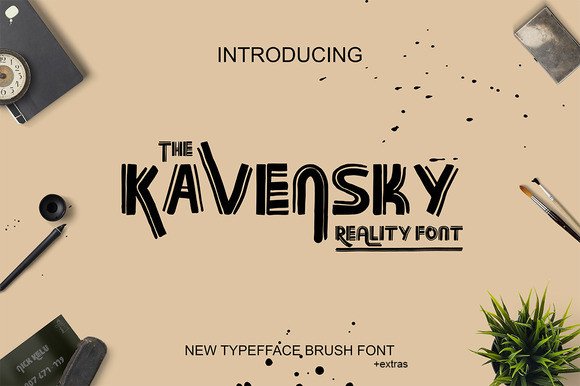
Kavensky: Why This Brush Font Demands More Than Just a Quick Download
It is tempting to treat a new typeface like a shortcut. You find one that looks beautiful in a preview gallery, click download, and expect it to instantly elevate your next project. But a font like Kavensky, with its distinctive brush-inspired character, does not work that way. This is not a neutral utility font. It is a design element with personality, weight, and attitude. When used carelessly, it can undermine your message instead of strengthening it. The goal here is not to discourage you from using Kavensky. It is to help you avoid the common missteps that turn a promising design choice into a regrettable one.
What Kavensky Actually Brings to Your Work
Kavensky is a brush font that mimics the natural variation and organic flow of hand-painted lettering. Each character carries subtle texture, irregular edges, and a sense of movement that digital fonts often lack. This makes it particularly effective for projects that need a human touch—think wedding invitations, greeting cards, branding materials, business cards, quotes, posters, and social media graphics. Its appeal lies in its authenticity. Unlike rigid geometric fonts, Kavensky does not pretend to be perfect. That is its strength, but only if you understand how to work with its imperfections.
Mistake Number One: Choosing Kavensky for the Wrong Project
The most common error I see is selecting a brush font like Kavensky for a project that demands clarity, formality, or high legibility at small sizes. This happens when people fall in love with the aesthetic without considering the context. A beautiful brush script can look stunning on a poster header, but it becomes nearly unreadable when used for body text or tiny product labels. The mistake is not inherent in the font itself—it is in the application.
What to do instead: Use Kavensky as a display font. Reserve it for headlines, short phrases, and design elements where its texture and personality can breathe. If you need to communicate detailed information, pair it with a clean, neutral sans-serif like Open Sans or Lato. This contrast gives your design hierarchy while keeping the reading experience comfortable. For example, a wedding invitation might use Kavensky for the couple's names and the main phrase, then switch to a simple serif for the date, location, and details. This approach respects both the font's character and the user's need to read clearly.
Mistake Number Two: Overcrowding Your Layout with Texture
Because Kavensky has a rich, textured appearance, beginners often surround it with other busy elements—patterns, heavy borders, multiple colors, or additional decorative fonts. The result is visual noise. Each element competes for attention, and the font loses its impact. Instead of reading the message, the viewer's eye wanders without landing anywhere.
A better approach: Give Kavensky room to perform. Use generous white space around your text. Limit your color palette to two or three complementary tones. If you want to add a decorative element, keep it minimal—a subtle line or a single floral accent. The goal is to let the font's brush texture be the hero. A clean background and strategic spacing will make each letterform feel intentional, not chaotic. Think of Kavensky as the lead actor in your design. Everything else is supporting cast.
Mistake Number Three: Ignoring Letter Spacing and Line Height
Brush fonts are not designed with the same spacing logic as text fonts. If you install Kavensky and use the default character spacing from your design software, you will likely end up with letters that feel cramped or disconnected. This is because the strokes extend unpredictably, and the default kerning may not account for the extreme angles and swashes that brush fonts include.
What you need to adjust: Manually set the tracking (letter spacing) and leading (line height) for every use case. For headlines, increase the tracking slightly to give each character breathing room. For short quotes, adjust the leading so that descenders from one line do not collide with ascenders from the next. A simple test: zoom in and check whether the thick brush strokes create distracting gaps or overlaps. If they do, adjust until the text feels balanced. It takes ten seconds and makes a professional difference.
Mistake Number Four: Using Kavensky Without Checking Licensing Terms
This is the least creative mistake but potentially the most costly. Many brush fonts, including Kavensky, come with specific license restrictions. A personal use license does not cover commercial projects like logos, product packaging, or merchandise. Entrepreneurs and small business owners often assume that because they bought or downloaded the font once, they can use it everywhere. That assumption can lead to legal notices, fines, or having to redesign a brand identity from scratch.
Practical advice: Before you download or purchase Kavensky, read the license terms carefully. Look for the distinction between personal use, commercial use, and extended licensing. If you are a freelancer or business owner, buy a license that explicitly covers your intended use cases. Keep a copy of the license file in your project folder. This is not fear-mongering—it is standard professional practice. A few extra dollars upfront saves you from much larger headaches later.
Mistake Number Five: Expecting Plug-and-Play Perfection
Kavensky, like most brush fonts, does not come with automatic ligatures, contextual alternates, or stylistic sets enabled by default. Many users open their design tool, type their text, and wonder why it looks flat compared to the preview images. The reason is that the preview often showcases carefully selected alternates that the font designer included but that are not automatically applied. If you do not access these features, you are using only a fraction of the font's potential.
How to avoid this: Learn the basics of OpenType features in your design software. In Adobe Illustrator, InDesign, or Affinity Designer, open the Glyphs panel or Character panel and look for stylistic alternates, swashes, or ligatures. For Kavensky, you may find multiple versions of the same letter—some with longer descenders, others with different brush angles. Experiment with these to create a custom look. This step separates a generic result from a polished, professional one. It takes a few minutes of exploration and gives your design a bespoke feel that cannot be replicated by someone who just types and exports.
Practical Steps Before You Commit to Kavensky
Before you decide whether Kavensky is right for your next project, test it in context. Create a mockup with your actual content—not just a placeholder word like "Hello" or "Family." Does it work at the size you need? Does it still look good when scaled down for a social media square or scaled up for a poster? Print it if possible; what looks crisp on screen often reads differently on paper, especially with brush textures that may lose definition.
Also, consider the emotional tone. Kavensky carries a casual, artistic, and slightly rustic feel. It suits organic brands, handmade products, creative workshops, and personal celebrations. It may clash with corporate, legal, or technical content. If your audience expects precision and formality, a brush font can create unintended dissonance. There is no right or wrong here—only fit. The most experienced designers are not the ones who use the most fonts. They are the ones who choose the right font for the message, the medium, and the audience.
Making Kavensky Work for You
Kavensky is a capable and visually engaging typeface when you treat it as a design material rather than a typing shortcut. Avoid the common pitfalls: using it where readability suffers, crowding it with other busy elements, neglecting spacing adjustments, ignoring licensing, and failing to activate its OpenType features. Each of these corrections is simple to implement but dramatically changes the final quality of your work.
If you approach Kavensky with intention—matching it to the right project, pairing it with complementary fonts, giving it space, and exploring its stylistic depth—it will reward you with results that feel personal and polished. That is the difference between a font that just sits on your computer and one that elevates your next invitation, branding piece, or poster. The choice is not just about which font to download. It is about how you choose to use it.