Snake: A Hand Lettering Brush Font for Creative Design Projects
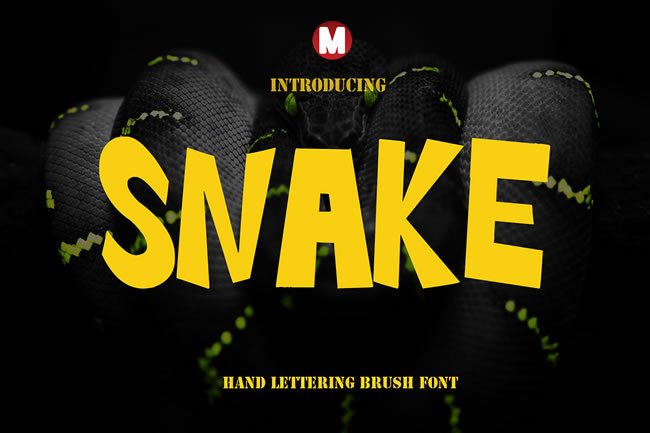
When you are working on a design project, the font you choose can make or break the final result. Whether you are crafting an invitation, building a brand identity, or designing a social media graphic, the typography sets the tone and communicates the mood before a single word is read. Snake is a hand lettering brush font that brings a natural, artistic feel to your work. It is designed for those who want to add personality, warmth, and a handcrafted touch to their designs. Unlike standard typefaces that feel mechanical, Snake offers the look of real brush strokes, giving your text a flowing, organic character.
This article explores what Snake is, how it can help you solve common design challenges, and practical ways to use it across different projects. Whether you are a professional designer, a small business owner, or someone planning a special event, you will find useful insights on how to make the most of this versatile font.
What Makes Snake Different from Standard Fonts
Snake is not a typical font. It is a hand lettering brush font that mimics the natural variation of a real brush pen. Each letter has subtle thickness changes, slight imperfections, and a flowing rhythm that feels handwritten. This makes it ideal for projects where you want to convey authenticity, creativity, or a personal touch.
Another important aspect is that Snake is a color font in the OpenType-SVG format. This means the font itself contains color and gradient information, so you can type directly in full color without needing to manually apply fills or effects. It works seamlessly in popular design software like Photoshop, Illustrator, Silhouette Studio, and Inkscape. However, note that the OTF and TTF versions are not compatible with Cricut, so if you use that machine, you will need to work with the SVG color font in compatible software or convert your designs accordingly.
Common Design Challenges and How Snake Helps
Many designers and non-designers alike face similar challenges when choosing typography for their projects. Let's look at a few common situations and how Snake can provide a solution.
Creating a Handcrafted Look Without Drawing Skills
Not everyone has the time or skill to hand-letter text for every project. You might want a custom, hand-painted look for a wedding invitation or a quote poster, but you do not have the tools or steady hand to create it yourself. Snake solves this by giving you the look of hand lettering instantly. Just type your text, and it appears with natural brush strokes. You get the artistic result without needing to pick up a brush.
Making Designs Feel Personal and Warm
Standard fonts can feel cold or impersonal. For projects like greeting cards, thank-you notes, or branding for a creative small business, you need warmth and approachability. Snake's brush lettering style adds a human element. It feels like someone actually wrote the words, which helps your audience connect emotionally with the design. This is especially valuable for personal projects or brands that want to feel friendly and authentic.
Adding Visual Interest to Simple Layouts
Sometimes a design needs a focal point or a touch of flair. A simple layout with a bold brush font can become instantly more engaging. Snake works well as a headline or accent text. Because it has a strong visual presence, you can use it sparingly to draw attention without cluttering the design. Pair it with a clean, simple sans-serif font for balance, and you get a professional look that still feels creative.
Practical Applications of Snake in Real Projects
Now let's explore specific ways you can use Snake in your own work. The font's hand lettering style makes it suitable for a wide range of applications, from print to digital.
Invitations and Greeting Cards
For weddings, birthdays, baby showers, or holiday parties, the invitation sets the expectation. Snake gives invitations a romantic, whimsical, or rustic feel depending on how you style it. Use it for the main headline like "You're Invited" or for the couple's names on a wedding invitation. The brush stroke texture adds elegance without being overly formal. For greeting cards, Snake works beautifully for short messages like "Thank You," "Happy Birthday," or "Thinking of You." The handcrafted look makes the card feel more personal, as if you wrote it yourself.
Branding Materials and Business Cards
Small businesses, creative freelancers, and artisans often want branding that reflects their handmade or personal approach. Snake can be used on business cards, letterheads, and packaging to convey creativity and authenticity. For example, a bakery could use Snake for its logo on packaging, giving it a homemade, artisanal feel. A calligrapher or illustrator might use Snake on their business card to showcase their style. The color font feature means your branding can have built-in color accents, helping you stand out.
Quotes and Posters
Inspirational quotes and poster designs rely heavily on typography to create impact. Snake's bold, flowing letters make it ideal for short, memorable phrases. Try using it for a motivational quote on a wall print or a social media graphic. Because it is a display font, it works best when the text is large and becomes the main visual element. Pair it with a subtle background or a simple illustration for a clean, striking design.
Digital Designs for Social Media and Web
Snake is not just for print. You can use it in digital projects as well, especially in Photoshop and Illustrator. Create eye-catching social media posts, YouTube thumbnails, or website headers with the font. The color feature works well on screens, adding vibrancy without extra work. For digital use, ensure the text is large enough to read, as brush fonts can become harder to read at small sizes.
How Different Users Can Approach Snake
The way you use Snake may depend on your skill level, tools, and project goals. Here are three common user profiles and how they might approach this font.
The Professional Graphic Designer
If you are a designer, you will appreciate Snake for its authentic brush texture and color capabilities. You can use it as part of a larger typographic system, layering it with other fonts for contrast. Because it is OpenType-SVG, you can manipulate the color in compatible software or leave it as is for quick results. You might also use it to create custom logos, wedding suites, or branding packages for clients who want a handcrafted aesthetic. Just be mindful of Cricut limitations if your projects involve that platform.
The Small Business Owner or Crafter
If you run a small business or sell handmade goods, Snake can help you create professional-looking materials without hiring a designer. Use it for product labels, signage, business cards, or social media graphics. The font saves you time because you do not need to manually add color or effects. For Silhouette users, Snake works well for making cut-out designs or printed labels. If you use Cricut, remember to use the SVG version or design in compatible software first.
The Event Planner or Host
For weddings, parties, or personal events, you may want to design your own invitations, place cards, or thank-you notes. Snake gives you a high-end look without the cost of a calligrapher. Use it sparingly for key words to keep the design elegant. If you are not experienced with design software, start with simple layouts: a centered headline with a clean font for body text. The color options can help you match your event's palette without extra work.
Useful Considerations When Working with Snake
To get the best results with Snake, keep a few practical tips in mind.
- Pair with simple fonts. Because Snake is decorative, combine it with a neutral sans-serif or serif font for body text. This creates contrast and improves readability.
- Use at larger sizes. Brush fonts are most effective when used for headlines or short phrases. At small sizes, the details can get lost, so reserve Snake for text above 24 points.
- Check compatibility. Snake works in Photoshop, Illustrator, Silhouette, and Inkscape. For Cricut users, use the SVG color font within compatible software or convert your design to a print-then-cut image.
- Experiment with color. Since Snake is a color font, you can type in vibrant hues or gradients automatically. This saves time and lets you focus on layout and composition.
- Limit the number of words. For the best visual impact, use Snake for a few key words rather than long paragraphs. Short messages let the brush strokes shine.
Getting the Most Out of Your Font Investment
When you purchase Snake, you are not just getting a set of letters. You are getting a tool that can elevate your design work and save you time. To make the most of it, explore the font in different software and test it with various color schemes. Try combining it with textures, watercolor backgrounds, or simple line art to enhance the handcrafted feel.
If you are new to using color fonts, take a few minutes to learn how OpenType-SVG works in your chosen software. Adobe programs handle them well, and Inkscape offers good support. For Silhouette users, you can use the font in the Silhouette Studio software for print designs or for cutting vinyl with the proper settings. For detailed guidance, refer to resources like the Ultimate Font Guide, which provides step-by-step instructions for installing and using color fonts across different platforms.
Final Thoughts on Snake for Your Creative Projects
Snake is more than a font. It is a creative resource that brings the beauty of hand lettering into your design toolkit. Whether you are a seasoned designer or someone planning a special event, you can use Snake to add warmth, personality, and visual interest to your work. By understanding where it shines best and pairing it thoughtfully with other elements, you can create professional, heartfelt designs that resonate with your audience.
Remember that the best results come from using Snake intentionally. Choose it for projects where a personal, artistic touch matters. Use it for headlines, names, and short phrases. And always test your design in the medium where it will be used, whether that is print, digital, or cut material. With a little practice, Snake can become a go-to font in your creative workflow.