Frederik: A Vintage Display Font with Timeless Appeal
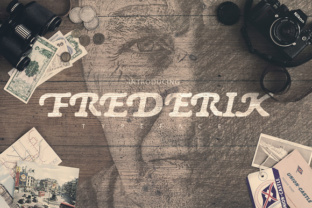
If you’ve been searching for a typeface that instantly communicates nostalgia, warmth, and sophistication, Frederik is worth a close look. This classic display font draws heavily from mid-century design sensibilities, combining generous curves, subtle contrasts, and a refined, almost hand-lettered feel. It’s not just another retro font—Frederik has a balanced structure that makes it surprisingly versatile for modern projects, provided you use it thoughtfully.
Because Frederik exudes such a strong personality, it’s easy to make assumptions about where and how it should be applied. Many designers—both beginners and experienced professionals—fall into predictable traps that diminish the font’s impact. Let’s walk through the most common mistakes, misunderstandings, and overlooked details so you can get the best results from this elegant typeface.
Mistake #1: Treating Frederik as a Workhorse for Body Text
The first and most frequent error is using Frederik for large blocks of copy. Yes, the letters are beautiful, and it’s tempting to let that beauty carry long paragraphs. But Frederik is a display font—it’s designed to grab attention in headlines, titles, and short phrases. When you compress paragraphs of 12–14 point text, the delicate details (the slight swashes, the uneven stroke weights) become muddy, and readability plummets.
What to do instead: Reserve Frederik for hero sections, logos, product names, or pull quotes. For longer reading, pair it with a clean, neutral sans-serif like a geometric or grotesque. The contrast will let each font shine without competing.
For example, a vintage-style poster for a craft coffee brand might use Frederik for the brand name and tagline, then a straightforward typeface like Open Sans or Montserrat for the description and ingredients. Your audience will appreciate the clarity, and the display use of Frederik will feel intentional, not forced.
Mistake #2: Overlooking the Importance of Spacing and Context
Frederik’s retro elegance comes partly from its generous letterforms and slightly open spacing. But many designers assume they can drop it into any layout without adjusting kerning or line height. The result is text that feels either too tight (letters collide and lose definition) or too loose (the nostalgic rhythm disappears).
Another subtle problem is ignoring the background. Frederik looks stunning on warm, muted colors—think cream, terracotta, olive, or aged paper textures. Placing it directly on a bright white or high-contrast neon background can wash out the subtle vintage character. The font wants a bit of warmth to feel at home.
Practical fix: Before finalizing a design, zoom in on a few representative letter pairs (like “AT,” “Wo,” “fr”) and adjust kerning if needed. Most font editing tools let you tweak this manually. For the background, test the font against three or four earthy tones—you’ll quickly see which brings out the best visual richness.
Mistake #3: Pairing Frederik with the Wrong Fonts (or Nothing at All)
A strong display font demands a cooperative partner. The most common failing is pairing Frederik with another decorative font—especially another retro style. When both fonts scream “look at me,” the design becomes chaotic and unfocused. The reader doesn’t know where to look first, and the vintage effect becomes a caricature instead of a quality statement.
Conversely, using Frederik entirely alone (for all text elements) often leads to monotony or a forced theme. Even in a minimalist design, having a secondary typeface for body copy, captions, or subheadings improves hierarchy and flow.
Better approach: Choose a reliable sans-serif like Helvetica Neue, Futura, or Gotham for supporting text. If you want to stay slightly warmer, try a clear sans like Nunito or Lato. The key is to pick a partner that offers contrast in weight and structure, not in decoration. Frederik provides the personality; the secondary font provides the readability.
For a product label, for instance, Frederik might say the product name, and a simple sans-serif lists the ingredients and net weight. That pairing feels professional, not costume-like.
Mistake #4: Downloading from Unreliable Sources or Ignoring Licensing
Everyone loves a free font. And Frederik is available from several sources—some reputable foundries, some less so. The danger is that free versions may be missing characters (no numerals, no punctuation, limited ligatures) or may have been altered without permission. Poorly digitized fonts can cause rendering issues, uneven spacing, and legal headaches if used commercially.
Even if you find a legitimate free version, always check the license. Some permits only personal use; others require attribution or a paid commercial extension. Using a font without the proper license—even unintentionally—can lead to takedown notices or fines, especially in branded materials or products for sale.
What to do: Buy Frederik directly from a known type foundry (or an authorized retailer like MyFonts, Fontspring, or Adobe Fonts). Review the EULA (end user license agreement) for details about web embedding, app use, and commercial projects. A paid license is usually a one-time cost that grants peace of mind and access to the complete character set. If you are a student or hobbyist on a budget, look for legitimate free alternatives that offer a similar vintage feel with a clear license—but always verify the terms.
Mistake #5: Misreading the “Retro” Vibe as Merely Old-Fashioned
Some designers lean too hard into the nostalgic aspect, pairing Frederik with excessive textures, scratches, and filters in an attempt to make it look “antique.” That can work for certain projects (like a whiskey label or a speakeasy poster), but it often overwhelms the font’s inherent elegance. Frederik doesn’t need layers of grit to feel vintage. The letterforms themselves carry the history.
A subtler error is assuming that every project with Frederik must be completely retro. In reality, this font works beautifully in modern contexts when used sparingly. A clean layout with lots of white space and a single Frederik headline can feel refreshingly sophisticated—more Mad Men than Wild West.
Advice: Let Frederik do the heavy lifting of nostalgia. Keep your backgrounds, textures, and supporting graphics minimal. A muted color palette, a bit of intentional white space, and careful alignment will make the font stand out without shouting. For a fashion lookbook, for example, use Frederik for the title on a simple matte background, then let modern photography and clean typography take over.
Mistake #6: Ignoring Scalability Across Mediums
Frederik shines at large sizes—think 36 points and above. At very small sizes (below 18 points), the details tighten up, and the font can lose its charm. Many designers create a beautiful poster or website banner, then attempt to reuse the same style for business cards or mobile app buttons. The result disappoints.
Better practice: Before committing to Frederik, test it at the actual sizes you need. If you plan to use it on packaging that will be viewed both on a shelf and in an online thumbnail, check both extremes. If the small version looks cramped, consider using a slightly adapted version (some foundries offer different weights), or reserve Frederik for larger elements and rely on a secondary font for the small details.
A real-world example: a boutique soap brand wanted Frederik for their logo and product labels. At logo scale (about 3 inches wide), it looked perfect. For the ingredients list on the back, they switched to a small text sans-serif. The brand maintained cohesion because the logo font was still present as a strong anchor.
Mistake #7: Relying on Default Letter Spacing
This is one of the most subtle but impactful errors. Display fonts often come with default tracking (global letter spacing) that works at standard sizes—but not always. If your headline is extremely large (like a hero banner 100+ pixels), the default spacing may feel too tight or too loose depending on how the font was hinted.
What to check: After setting your headline, increase the tracking slightly (+2 to +5) and see if the word gains a more airy, graceful feel. Decrease tracking by a few units if phrases look disconnected. Small adjustments make a huge difference in how professional the final design appears.
For example, in a wedding invitation using Frederik for the couple’s names, adding +3 tracking can elevate the elegance. Without it, the letters may feel cramped and heavy. Test both ways and compare side by side—you’ll see the nuance.
Final Thoughts on Working with Frederik
Frederik is a font that rewards attention to detail. Its vintage appeal is genuine, but using it effectively requires knowing where it fits, what to pair it with, and how to control the environment around it. The mistakes above are common, but they are also easily avoidable once you understand the font’s strengths and limitations.
Before you finalize a project, take a moment to review your choices: Are you using Frederik at a size and context that plays to its display nature? Is the letter spacing adjusted? Have you chosen a complementary second font? Is the license valid for your use case? These small checks separate a design that feels like a thoughtful homage from one that looks like an imitation.
When done right, Frederik brings a timeless, approachable sophistication to any concept—whether you’re branding a bakery, designing event materials, or building a website for a lifestyle brand. Approach it with respect and intention, and the font will serve your work exceptionally well.