Regress: A Hand-Drawn Font for Authentic Vintage Design Workflows
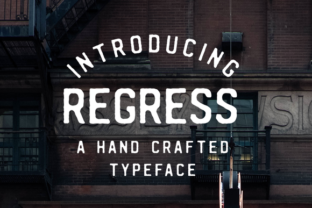
When you work with type regularly, you start to notice patterns. Most digital fonts are too clean. They arrive perfectly spaced, mathematically aligned, and utterly neutral. That works for body copy and corporate decks. But when you need a design to feel personal, worn, or genuinely handcrafted, those clean vectors work against you. That is where Regress enters the process. Regress is a hand-drawn font inspired by vintage mid-1990s posters, with soft, rugged edges that give your designs a handmade, personal feel. It is not a novelty font meant for one-off headlines. It is a practical tool you can integrate into real workflows, from branding and publishing to content creation and product packaging.
What Regress Is and Where It Belongs in Your Process
Regress belongs in the category of display typefaces, but it behaves differently than most. Its letterforms are not mechanically reproduced. They carry the subtle inconsistencies of hand-drawn ink on paper. The edges are soft and rugged, not crisp or geometric. This gives Regress a natural, unpolished character that feels rooted in physical media rather than screen rendering.
For designers, marketers, and independent creators, this matters because the visual language of authenticity is in high demand. Audiences are fatigued by stock photography, templated layouts, and generic sans-serif headings. Regress offers an alternative that does not require you to hire a lettering artist or scan physical drawings. It sits directly inside your font library, ready to be applied to headlines, quotes, badges, posters, social graphics, and physical collateral.
In a broader workflow, Regress is most useful during the expressive phase of a project. You do not use it for long-form reading or data-heavy layouts. You use it when you need to communicate tone, personality, and a sense of time. The 1990s poster influence is intentional. That era combined DIY aesthetics with early digital experimentation, and Regress captures that intersection well.
Before the Project: Planning with Regress in Mind
Integration starts before you open your design software. If you are planning a branding project, a product launch, or a content series, ask yourself: does this need to feel human? If the answer is yes, Regress should be part of your early planning.
Consider how the font will interact with your primary typeface. Regress works best as a complementary display face. Pair it with a clean, neutral sans-serif for contrast. The roughness of Regress gains power when it sits next to something restrained. During the planning stage, define the hierarchy. Will Regress carry your main headline? Your subheads? Your pull quotes? Decide this before you start comping layouts, and you will avoid forcing the font into spaces it does not fit.
Preparation also means checking compatibility. Regress is a standard font file that works across macOS, Windows, and most design platforms including Adobe Creative Suite, Affinity, Canva, and Figma. Test it on your intended output medium early. If you are designing for print, check how the soft edges rasterize. If you are designing for web, preview it at different sizes. The rugged edges that feel intentional at large sizes can become muddy at small sizes. Plan your minimum size during prep, not after you have already built a layout.
During the Creative Work: Integrating Regress into Your Tools and Methods
Once you begin designing, Regress should be treated as an active material, not a passive choice. The handmade quality of the font invites you to handle it with care. Letter spacing, for example, becomes more important. Because the glyphs are irregular, auto-kerning may not be sufficient. Manually adjust tracking for headlines. Tighten it for a dense, organic block. Loosen it for a breathable, poster-like feel.
Regress interacts well with textures, paper backgrounds, and ink effects. If you layer the font over a scanned paper texture or a subtle grain, the rugged edges align visually with the surface noise. This is especially useful for creators building packaging, merchandise, or social templates that need to feel tactile without being literal. For bloggers and publishers, Regress applied to title cards and quote images creates a consistent visual signature that separates your content from templated feeds.
In collaborative workflows, Regress simplifies handoff. You do not need to embed custom lettering files or explain art directions for hand-drawn elements. The font is the asset. A team member working on a different piece of the project can apply the same Regress style and get consistent results. This keeps quality control manageable across multiple deliverables.
For entrepreneurs and small business owners, Regress is useful for creating branded materials without outsourcing. A single font can unify your website headers, product labels, email headers, and promotional PDFs. You do not need to be a trained typographer to use it well. The key is restraint. Use Regress in one or two places per layout. Let the font do the work, and do not crowd it with competing decorative elements.
After the Design: How Regress Affects Output, Quality, and Consistency
After you finalize a design, review how Regress performs in context. Because it is hand-drawn, the font carries emotional weight. A headline that reads as nostalgic and approachable in one layout can feel messy or unserious in another. Evaluate the tone honestly. If your project requires authority and precision, Regress may not be the right fit. But if your goal is connection, warmth, and a sense of human presence, the font will serve you well.
For long-term use, build a simple usage guide for yourself or your team. Document which pairings work, what sizes feel best, and where Regress should not be used. This protects consistency across projects. Over time, Regress becomes a recognizable part of your visual identity. Readers and customers begin to associate the rugged, hand-drawn feel with your brand, not just with a particular campaign.
Quality control also means watching for legibility. Regress is not a font you want to set in all caps for long strings. The irregular shapes become harder to parse when every letter is uppercase. Use sentence case or title case for readability. If you need all caps, keep it short: three to five words maximum.
Practical Workflow Examples
Here are a few concrete scenarios where Regress integrates smoothly into a real process:
- Product packaging for a small batch brand. Use Regress for the product name on a label. Pair it with a clean sans-serif for ingredients or instructions. Print on kraft paper or matte stock. The rugged edges complement the natural material.
- Social media templates for a content creator. Build a set of Instagram story templates using Regress for the main quote or title. Keep the background minimal. The font provides the personality. This saves time because you do not need to redraw lettering for each post.
- Digital publishing for an independent magazine. Use Regress for section headers and pull quotes. The contrast between the hand-drawn headers and your body typeface creates visual rhythm. Readers perceive the publication as curated, not templated.
- Poster design for a local event. Regress is almost a direct transplant from 1990s poster culture, so it works naturally here. Layer it over a photo or texture. Adjust tracking manually. Add a subtle offset shadow for depth.
- Educational materials for a workshop or course. Use Regress on title slides, workbook covers, and email headers. It signals that the content is personal and instructor-led, not corporate and automated.
Long-Term Use and Compatibility Considerations
Regress is a single font file, but it behaves like a system when used deliberately. Over months and years, you can build a library of templates, presets, and brand assets around it. Because it is hand-drawn, it does not date quickly. The 1990s influence is specific enough to evoke nostalgia but general enough to stay relevant as trends shift.
Compatibility with other tools is straightforward. Regress works in any application that accepts OpenType or TrueType fonts. If you use Figma, you can create shared team component libraries that include Regress styles. If you use Canva, upload the font once and it applies to all your team templates. If you work in print production, confirm with your print shop that the font will embed correctly in your PDFs. Most modern printers handle it without issue.
One factor that improves long-term use is organizing your font library. Keep Regress in a dedicated folder with its license file and any notes you have on pairing and sizing. This is especially useful if you collaborate with freelancers or agencies. You can send the font file along with a one-page usage guide. This prevents misuse and keeps your visual identity intact.
Efficiency comes from repetition. The more you use Regress, the faster you will know when to reach for it and when to set it aside. Early on, you may overapply it because it feels fresh. That is normal. After a few projects, you will develop instincts for where the font adds value and where it distracts. Trust those instincts.
Making Regress Part of Your Routine
Adopting a new font is not a major workflow change. It is a substitution. You replace a neutral or generic font with one that carries more personality. The process around the font stays the same: you still plan your hierarchy, adjust your spacing, test your outputs, and maintain consistency. The difference is in the result. The result feels more personal, more deliberate, and more connected to the physical world of print and ink.
Regress is not a font for every project. But for the projects where it fits, it becomes a reliable tool rather than a decorative afterthought. If you work in design, marketing, publishing, or independent creative production, Regress deserves a place in your type library. It is one of those rare assets that improves your output immediately, without requiring you to change your entire process. You just swap the font, adjust the spacing, and let the rugged, hand-drawn edges do the rest.