Barry Typeface: A Versatile Font with Practical Appeal
Choosing the right typeface can make or break a design project. When you come across a font that claims to work for headings, logos, banners, posters, book covers, and invitations, it’s natural to feel intrigued. Barry is one such typeface, offering two distinct weights—Thin and Black—that open up a wide range of possibilities. But versatility alone doesn’t guarantee success. Many people jump into using a new font without fully understanding its strengths, weaknesses, and best-use scenarios. This article walks you through common mistakes, overlooked details, and practical corrections so you get the most out of Barry without the frustration.
What Makes Barry Stand Out
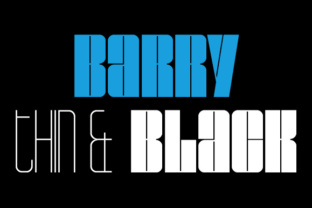
At first glance, Barry appears straightforward: a clean sans-serif with an extreme weight contrast. The Thin weight is delicate and airy, perfect for elegant, minimal looks. The Black weight is bold and commanding, ideal for grabbing attention. This duality is rare—most fonts offer a range of intermediate weights, but Barry focuses on the two extremes, which is both its strength and a common source of misuse. When used thoughtfully, Barry can elevate everything from a luxury brand logo to a playful poster. When misapplied, it can make text unreadable, unbalanced, or just awkward.
Mistake 1: Using Thin for Body Text in Digital Contexts
One of the first temptations is to use the Thin weight for longer paragraphs because it looks sleek and modern. But here’s the problem: on screens, thin strokes often become nearly invisible at small sizes, especially on low-resolution displays or when the background has even a slight pattern. Readers will strain their eyes, and your message gets lost. Even in print, Thin can be problematic if the point size is too small or if ink spreads on porous paper.
Better approach: Reserve the Thin weight for large headlines, short callouts, or decorative elements where you control the size and contrast. For body text, either use the Black weight at a very small size (which looks unique but can be heavy) or pair Barry with a complementary medium-weight font. For digital body copy, consider a neutral sans-serif like Open Sans or Lato alongside Barry’s Black for titles. Your users will appreciate readability.
Example
Imagine a banner for a gallery opening. Using Barry Thin at 36 pt for the gallery name works beautifully. But if you set the event details in Thin at 12 pt, no one will read them. Instead, use Barry Black for the name and a simple serif for the details. This maintains the elegant aesthetic without sacrificing legibility.
Mistake 2: Overusing Black Without Considering Tone
The Black weight of Barry is assertive. It can dominate a layout quickly. A common mistake is using it for every heading, subheading, and highlight in the same project, creating visual noise and making the design feel aggressive. This is especially true in branding where a light, friendly tone is desired. The boldness of Black can clash with soft imagery or playful copy.
Better approach: Use Barry Black sparingly. Think of it as an accent rather than your go-to. Reserve it for primary headlines, important numbers, or short phrases that need maximum impact. For secondary headings, consider using Thin in uppercase or a different weight from a complementary font. Balance is everything. A poster that uses Barry Black for the main event title and Barry Thin for a subtle tagline creates hierarchy and interest without overwhelming the viewer.
Mistake 3: Ignoring Kerning and Spacing Adjustments
Barry’s extreme weights come with distinct spacing challenges. In Thin, letters can appear too far apart if the default kerning is left unchanged, making the text feel disconnected. In Black, the tight fit can create crowding—especially with uppercase characters or punctuation. Many beginners assume the font’s default spacing is perfect, but that’s rarely the case for display use.
Better approach: Always adjust tracking (letter spacing) and kerning in your design software. For Thin, a slight increase in tracking (maybe 20–50 units) can improve readability in headlines. For Black, you may need to reduce tracking to avoid muddy silhouettes, or increase it slightly if you want a more airy, modern look. Test your text at actual display sizes. Don’t rely on a preview at 72 pt if your headline will be 18 pt on a banner.
Quick Check
- Does the word “WAVE” in Thin have consistent gaps between letters? If not, manually kern.
- Does the Black weight create dark blobs where letters like “A” and “V” meet? Adjust spacing or consider tracking.
- Print a sample at final size to see if the spacing still works—it often looks different on screen.
Mistake 4: Misjudging the Thin Weight’s Suitability for Small Logos
A logo needs to work in many sizes—on a business card, a website favicon, a large billboard. Barry Thin can look exquisite in a large logo for a fashion brand or a tech startup, but at small sizes (below 18 pt), the fine lines may disappear, especially against a complex background. The result is a logo that looks broken or incomplete. This is one of the most overlooked details when choosing a font for branding.
Better approach: If you love Barry Thin for a logo, create a simplified lock-up or consider a custom wordmark where the thin strokes are thickened slightly for small-scale reproduction. Alternatively, use Barry Black for the main logo and reserve Thin for secondary applications like watermarks or large signage. Test your logo at the smallest intended size on both screen and paper. If it’s illegible, revise before finalizing.
Mistake 5: Assuming Barry Works for Every Project Style
Because Barry looks modern and clean, it’s tempting to use it for everything. But its extreme weight contrast imposes a specific mood—minimalist, bold, sometimes stark. It may not suit projects that need warmth, tradition, or playfulness. For example, a children’s book cover or a cozy coffee shop menu might feel cold or unfriendly if overlaid with Barry’s sharp lines.
Better approach: Before choosing Barry, define the emotional tone of your project. If you need elegance, precision, or high contrast, Barry is an excellent choice. If you need warmth or whimsy, look elsewhere. Or use Barry as a display font paired with a softer companion. A wedding invitation could use Barry Black for “Mr. & Mrs.” and a flowing script for the names. This combination retains the sophisticated edge while adding romance.
Mistake 6: Downloading Without Checking Licensing or Format
This mistake applies to any font, but it’s worth repeating because it can cost you time and money. Many enthusiasts download free versions of fonts without checking if they’re licensed for commercial use. Barry may come in various formats (OTF, TTF, WOFF) and different licensing tiers. Using the free version on a client’s website or on a product you sell could lead to legal issues or having to redo work.
Better approach: Always read the license agreement before downloading. If you’re buying, ensure it covers your intended use—web embedding, app usage, logo creation, merchandise. If the font is free for personal use only and you’re a freelancer, you need a commercial license. Also check file format compatibility with your software (e.g., some very thin fonts may not render well as web fonts without optimization). A small investment in licensing saves headaches later.
Practical Advice for Getting the Most Out of Barry
Now that we’ve covered the pitfalls, here are actionable steps to integrate Barry successfully into your projects:
- Start with a purpose – Ask yourself: where will this font appear most often? Headlines? Logos? Posters? Let that guide which weight you emphasize.
- Test in context – Create mockups of your banner, book cover, or invitation with actual text. Look at it from a distance, up close, and at small sizes.
- Pair wisely – Barry Thin pairs well with geometric sans-serifs or thin serifs. Barry Black works nicely with light-weight scripts or humanist fonts. Avoid pairing it with another extreme weight font—it creates competition.
- Use negative space – Both Thin and Black benefit from generous white space. Don’t clutter the design. Let the type breathe.
- Consider color and background – Black weight on a dark background can disappear; Thin weight on a busy pattern is invisible. Adjust color contrast accordingly.
Real-World Scenario
A small business owner wants a logo and a banner for their new minimalist jewelry brand. They choose Barry. The logos look stunning in Black on a clean white background. For the banner, they initially set the tagline in Thin at 10 pt. After testing, they realize it’s unreadable from three feet away. They revise: main product name in Black at 48 pt, tagline in Thin at 24 pt, and contact info in a classic serif at 12 pt. The final banner is balanced, legible, and professional. This approach saves them from a costly reprint.
What to Check Before Committing to Barry
Before you finalize a design or purchase a license, run through this checklist:
- Have you tested the weight at the actual sizes you’ll use?
- Does the license cover all your applications (commercial, web, print)?
- Is the file format compatible with your design tools?
- Have you previewed the font in lowercase and uppercase for your specific words?
- Does the font evoke the right mood for your brand or project?
Answering these questions honestly will prevent disappointment and wasted effort.
Barry is a powerful typeface in the right hands. Its Thin and Black weights offer a unique contrast that few fonts can match. By avoiding the common mistakes outlined here—using thin weights where they vanish, overusing black, ignoring spacing, misjudging logo scalability, forcing the font into unfitting projects, and neglecting licensing—you’ll produce work that looks intentional and polished. Whether you’re designing a poster, a book cover, or an entire brand identity, let Barry be a deliberate choice, not a default. Your audience will notice the difference.