Reknar: A Handmade Brush Font for Purposeful Design Workflows
Typography is often the quiet backbone of a design project. It shapes tone, guides attention, and carries personality without saying a word. Choosing the right typeface is a decision that affects every downstream step, whether you are laying out a wedding invitation, building a brand identity, or composing a poster. Reknar is a handmade brush font that brings an authentic, tactile quality to digital and print projects. Understanding how it fits into a broader creative process can help you use it more effectively, avoid common missteps, and produce consistent results across different types of work.
What Reknar Is and Where It Belongs
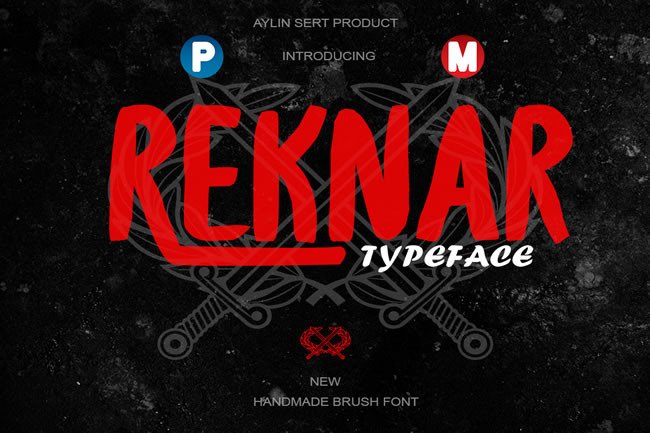
Reknar is a brush script typeface with a hand-drawn character. Unlike geometric sans serifs or rigid slab fonts, Reknar carries the imperfections of real brush strokes, with slight variations in weight, angle, and rhythm. This gives it a natural, expressive feel that works well in contexts where you want to convey warmth, craftsmanship, or a personal touch. It is not a neutral font. It has a strong voice, which means it works best when you intentionally pair it with simpler counterparts and use it at moments that benefit from emphasis.
In practical terms, Reknar is suited for headlines, short messages, and decorative elements. It is less effective for long body text, dense paragraphs, or data-heavy layouts. Knowing this limitation is part of integrating it into a workflow without friction. When you plan a project, Reknar typically enters the process at the point where you define visual hierarchy and decide which elements need to stand out.
Before You Start: Evaluating Fit and Preparing Your Assets
Before you open your design software, take a moment to assess whether Reknar aligns with the project’s goals. Ask yourself what emotional tone you need to communicate. A handmade brush font carries implications of authenticity, creativity, and human touch. It works well for artisan brands, creative portfolios, event invitations, and informal educational materials. It may feel out of place in corporate reports, legal documents, or highly technical manuals.
Preparation also involves understanding the technical requirements. Reknar, like any font, needs to be properly installed on your system and compatible with your design tools. Most modern design applications, including Adobe InDesign, Illustrator, Photoshop, Affinity products, Canva, and web-based platforms, support OTF and TTF font files. If you are using a collaborative tool like Figma or a content management system like WordPress, ensure that the font is either uploaded as a custom asset or referenced via a web font service if available. Taking a few minutes to test rendering in your target environment saves time later.
Building a Color and Texture Palette
Because Reknar has a brushed, textured appearance, it pairs naturally with muted backgrounds, paper textures, and earthy color schemes. Consider gathering inspiration images, color swatches, and complementary typefaces before you start designing. A clean sans serif like Open Sans, Montserrat, or Lato provides a neutral contrast to Reknar’s expressive strokes. You might also experiment with serif fonts for a more traditional or literary feel. Preparing these assets upfront means you can focus on layout and composition when you begin the actual design work.
During the Design Process: Placement, Hierarchy, and Pairing
Once you begin laying out a project, Reknar should be reserved for the elements that carry the most emotional weight. In an invitation, that might be the couple’s names or the phrase “join us.” In a branding project, it could be the company name on a logo or a key value statement on a landing page. In a poster, it might be the main headline or a short call to action. Using Reknar for every line of text dilutes its impact and can make the layout feel chaotic.
Setting Hierarchy with Reknar
Establish a clear visual hierarchy where Reknar occupies the top level. Below it, use a clean, readable font for secondary information. For example, on a greeting card, you might set “Happy Birthday” in Reknar at a large size, then use a simple sans serif for the message inside. On a business card, the company name in Reknar can sit above the tagline and contact details set in a neutral font. This contrast creates a natural flow for the reader’s eye and ensures that the handmade font does not compete with other elements for attention.
Adjusting Spacing and Size
Handmade brush fonts often have irregular letter spacing and varied stroke widths. Reknar is no exception. When you set it in your design, pay close attention to kerning and tracking. In some combinations, you may need to manually adjust spacing between specific letter pairs to achieve a balanced look. Similarly, avoid setting Reknar at very small sizes, below 14 or 16 points in many cases, because the brush details can become muddy and hard to read at small scales. Test your text at the intended output size, whether that is on a screen, a printed card, or a large poster, and make adjustments as needed.
Color and Background Considerations
Reknar’s textured strokes show up best against solid or subtly textured backgrounds. White or light cream backgrounds let the brush marks remain visible without competition. Dark backgrounds can create striking contrast, especially if you use Reknar in a lighter color like white, gold, or pastel. Avoid busy patterns directly behind the text, as they can obscure the font’s detail. If you must use a patterned background, place Reknar inside a solid shape or a subtle shadow box to maintain legibility.
After the Design: Quality Control and Output Consistency
When a project is nearing completion, Reknar deserves a dedicated review pass. Because its handmade nature means letters may not align perfectly in a mechanical sense, a quick scan for unintended spacing issues or awkward letter combinations is worthwhile. Print a test version if outputting to physical media. On screen, zoom in and also view at actual size to confirm readability.
Checking for Readability in Different Formats
If your project will appear in multiple formats, such as a digital invitation and a printed version, test Reknar in each environment. Screen rendering can make thin strokes appear lighter or cause anti-aliasing to blur edges. Print rendering depends on paper quality and ink type. A matte paper stock tends to show brush details well, while glossy stock may make strokes appear sharper. Adjusting the font weight or adding a slight stroke can help maintain consistency across mediums. If you are delivering final assets to a client or printer, include a note about the font used and any specific spacing adjustments you applied.
Building a Reusable Style Guide
If you plan to use Reknar across multiple projects or as part of a brand system, document your usage rules. Note which font pairings work best, what size range is ideal, which color combinations are effective, and any kerning adjustments you commonly make. This style guide speeds up future projects and ensures consistency when multiple people are involved. For a small business owner or freelancer, a simple one-page guide can save hours of rework and prevent inconsistent branding.
Practical Use Cases Across Different Workflows
To make the integration concrete, here are several common scenarios where Reknar fits naturally into a structured process.
Wedding and Event Invitations
Invitation design often follows a timeline: gather details, choose a theme, select typography, layout the card, and prepare for print. Reknar fits best at the typography and layout stages. Use it for the primary headline, such as the couple’s names or the phrase “together with their families.” Pair it with a clean serif or sans serif for the event details, date, and location. Because invitations often require physical printing, test Reknar on the actual paper stock you plan to use. A subtle texture in the paper complements the brush strokes and reinforces the handmade feel.
Branding and Logo Design
When building a brand identity, typography choices happen after the strategy is defined but before the full visual system is developed. Reknar can serve as the display font for the logo, especially for businesses in creative fields, artisan products, or personal brands. It works best when the logo mark itself is simple, allowing the letterforms to carry the personality. For supporting materials like business cards, letterheads, and social media templates, use Reknar sparingly, perhaps only in the logo lockup, and rely on a secondary font for body copy and subheads.
Social Media Graphics and Posters
For social media posts, flyers, and posters, the design process often starts with a key message or quote. Reknar is well suited for short, impactful statements. In a workflow where you start with the message, then choose imagery, then apply typography, Reknar enters at the typography stage. Because social media graphics are viewed on small screens, keep the text short, use ample spacing, and ensure sufficient contrast between the font and the background image. For posters viewed at a distance, a larger size and generous letter spacing improve legibility.
Greeting Cards and Personal Projects
Hobbyists and creators working on personal projects often have more freedom to experiment. Reknar can be used for the front cover message, inside sentiments, or decorative headings. The workflow here is typically iterative: sketch ideas, choose fonts, test layouts, print a sample, refine. Because Reknar is handmade in style, it pairs well with watercolor backgrounds, hand-drawn illustrations, or photographic elements with natural light. The key is to let the font breathe and not overcrowd it with competing textures.
Long-Term Use and Organization
If Reknar becomes a regular part of your type library, a small amount of organization goes a long way. Keep your font files in a dedicated folder, and if you work with a team, ensure everyone has the correct version installed. Tag or label Reknar in your font manager with relevant keywords such as “brush,” “handmade,” “display,” and “script” so you can find it quickly when you need it. Over time, you will develop a mental library of when and how to use it, which speeds up the initial planning phase of any project.
It is also worth noting that Reknar, like any font, can be overused. If you find yourself reaching for it in every project, step back and consider whether it is truly serving the message. A diverse type library gives you more options and prevents your work from feeling repetitive. Use Reknar when its handmade character adds meaning, not just because it looks attractive in isolation.
Final Observations for Practical Integration
Reknar is a tool, not a shortcut. It works best when you understand its strengths and limitations and when you place it intentionally within a larger workflow. Whether you are a professional designer building a brand system, a small business owner creating your own marketing materials, or a hobbyist making invitations for a family event, the same principles apply: plan before you place, pair with neutral counterparts, adjust spacing manually, test in the final medium, and document your decisions for future use.
By treating Reknar as one part of a structured process, rather than a standalone decorative element, you will produce more cohesive, readable, and effective designs. The font’s handmade quality can bring warmth and personality to your work, but that quality shines brightest when everything around it is chosen with the same care.